

How to Write a Virtual Assistant Resume With No Experience
Writing a resume is difficult when the job you want is not the job you have done before. You may have years of experience caring for customers, organizing records, coordinating schedules, preparing reports, or supporting a team—but none of your previous titles says “virtual assistant.”
That does not mean you have nothing valuable to offer.
A strong beginner virtual assistant resume connects your existing abilities to the work a client needs. It does not hide your background, invent online experience, or fill the page with software names you barely know. Instead, it presents honest evidence that you can communicate, stay organized, learn tools, protect information, and complete work responsibly.
This guide will help you build a clear and credible VA resume even if you have never held a virtual assistant position.
What Clients Look for in a Beginner VA Resume
Clients do not all look for the same thing. Some need help managing email and calendars. Others want support with research, content, data entry, customer service, or social media. Your resume should therefore respond to the specific job rather than describe every task you could possibly perform.
Most clients still look for a similar foundation:
- Clear written communication
- Reliability and time management
- Attention to detail
- Comfort with common online tools
- Ability to follow instructions
- Relevant transferable skills
- Evidence of initiative and learning
- Honest, professional presentation
Your goal is not to appear experienced in everything. It is to make the client confident that your background and current skills can support the role.
Start With the Job Description, Not a Blank Page
Before writing your resume, study several job descriptions for the type of VA work you want. Highlight the repeated tasks, skills, and tools.
For example, administrative VA listings may repeatedly mention:
- Inbox and calendar management
- Data entry
- Online research
- Google Workspace
- Meeting coordination
- File organization
- Written updates
Content-support roles may emphasize WordPress, Canva, proofreading, content calendars, image preparation, and publishing.
Use these patterns to decide what your resume should emphasize. Do not copy entire sentences from job advertisements. Identify the language clients commonly use, then describe your genuine experience in your own words.
Choose a Simple Resume Format
For most beginner virtual assistants, a clean reverse-chronological or combination resume works well.
A reverse-chronological resume lists your recent work first. It is useful when your past roles include transferable responsibilities.
A combination resume gives more space to relevant skills while still showing an honest employment history. This can help career changers connect previous work to virtual assistance.
Avoid overly decorative layouts, progress bars, tiny text, multiple sidebars, and excessive graphics. A resume should be easy to scan on a screen and simple for recruitment systems to read.
One or two pages is usually enough. A beginner does not need to make the resume longer simply to appear more experienced.
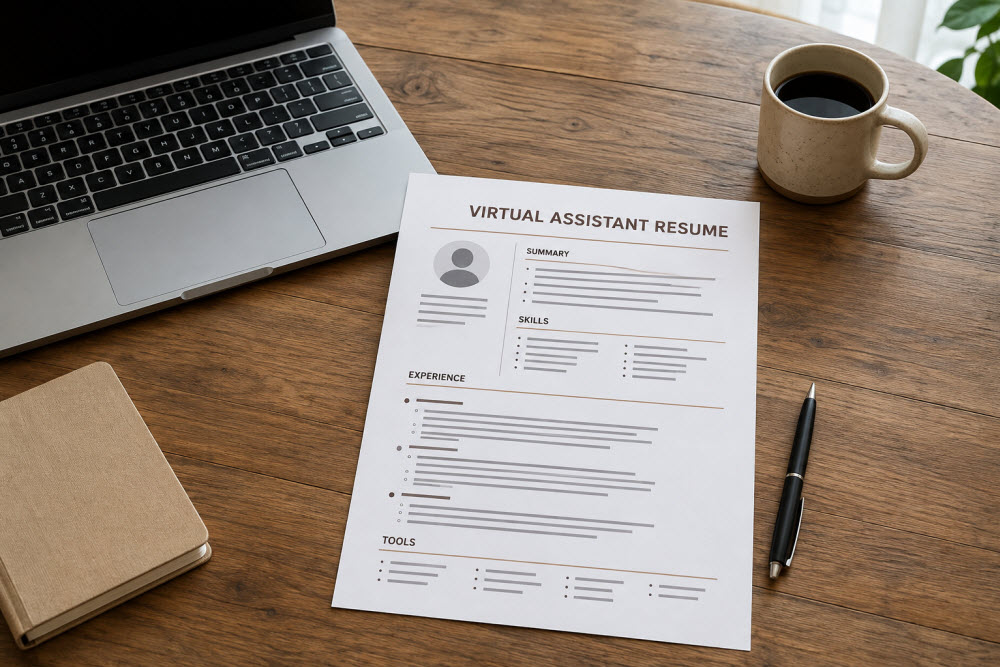
Essential Sections of a Beginner VA Resume
1. Name and Contact Information
Place your name, professional email address, city and country, phone number if appropriate, and portfolio or professional profile link at the top.
You generally do not need to include your full home address, age, religion, marital status, government identification numbers, or other sensitive personal details unless a legitimate local requirement specifically calls for them.
Test every link before sending the resume.
2. Targeted Professional Title
Use a title that reflects the work you are pursuing without overstating your level.
Examples include:
- Entry-Level Virtual Assistant
- Administrative Virtual Assistant
- Virtual Assistant | Research and Data Support
- Content and WordPress Virtual Assistant
- Customer Support Virtual Assistant
Avoid labels such as “expert” or “senior” when your evidence does not support them.
3. Professional Summary
Your summary should quickly explain your relevant strengths, transferable background, and the value you can provide. Three or four focused lines are enough.
Here is a beginner-friendly example:
Detail-oriented aspiring virtual assistant with experience organizing records, responding to inquiries, coordinating schedules, and preparing accurate documents. Comfortable with Google Workspace, online research, spreadsheets, and remote communication. Known for careful follow-through, clear updates, and a willingness to learn new systems.
This summary does not apologize for being new. It highlights useful experience without claiming paid VA work.
Avoid generic statements such as “hardworking person seeking a challenging position.” They do not tell the client what support you can provide.
4. Relevant Skills
Create a focused skills section based on the role. You might include:
- Email and calendar support
- Online research
- Data entry and spreadsheet management
- File organization
- Document formatting
- Customer email support
- Blog formatting and publishing
- Content calendar preparation
- Proofreading and quality checks
- Task and deadline tracking
Include only skills you can explain or demonstrate. If asked about spreadsheet management, you should be able to describe what you have actually done with spreadsheets.
Soft skills such as reliability and attention to detail are stronger when your experience bullets provide evidence of them.
5. Tools and Platforms
List relevant tools you have genuinely used, grouped clearly when helpful.
For example:
Productivity: Google Docs, Google Sheets, Google Drive, Microsoft Word, Microsoft Excel
Communication: Gmail, Zoom, Microsoft Teams, Slack
Project management: Trello, ClickUp, Asana
Content: WordPress, Canva
You do not need fifty tools. Clients are more interested in whether you can use the required ones responsibly than in the length of your list.
If you have only completed tutorials, be prepared to describe your practice projects honestly. Never list a platform simply because you recognize its name.
6. Work Experience
Your previous jobs may be more relevant than they first appear. Instead of focusing only on industry-specific duties, identify responsibilities that connect to VA work.
Suppose you worked in a clinic. A weak description might say:
- Assisted in daily clinic operations
A stronger, honest version might say:
- Maintained accurate appointment and patient records while following confidentiality procedures
- Coordinated schedules and communicated changes to staff and patients
- Responded to inquiries clearly and directed concerns to the appropriate team member
- Prepared routine reports and checked information for completeness
The second version does not pretend the position was virtual. It shows organization, communication, accuracy, and discretion—skills that can transfer to remote support.
Other transferable experience may come from retail, hospitality, education, healthcare, office administration, community work, family business responsibilities, or volunteer roles.
How to Write Strong Resume Bullets
Begin each bullet with a clear action and explain what you handled, how you approached it, or why it mattered.
A useful formula is:
Action + task + context or result
Examples:
- Organized digital and paper records to make frequently requested information easier to locate
- Responded to customer questions through email and phone while maintaining a polite and helpful tone
- Tracked deadlines and follow-up items for multiple ongoing requests
- Reviewed documents for missing information and corrected formatting before submission
- Prepared weekly reports by gathering, checking, and organizing data from several sources
Use numbers only when they are accurate and meaningful. If you regularly handled 30 customer inquiries per day, that detail may help. If you do not know the number, do not guess.
Avoid copying job-description duties word for word. Your bullets should describe what you truly did.
What to Include When You Have Little Formal Work History
If your employment history is limited, you can include other truthful evidence of readiness.
Practice Projects
Add a section titled Selected Projects or Virtual Assistant Practice Projects. Include two or three projects related to your target service.
Example:
Online Research Comparison | Self-Initiated Project
- Compared three email marketing tools using defined criteria, including pricing, features, and beginner usability
- Recorded source links and summarized findings in a decision-friendly spreadsheet
- Presented a short recommendation based on the fictional business requirements
Clearly label these as practice or self-initiated projects. Do not present an imaginary company as a client.
Volunteer Experience
Volunteer work can demonstrate scheduling, event coordination, social media support, recordkeeping, communication, or document preparation. Include the organization and dates when appropriate, and protect any confidential information.
Education and Relevant Training
List your degree, diploma, or relevant education. You can also include focused courses related to the job, especially when you completed practical exercises.
Do not overwhelm the page with every webinar you attended. Select training that strengthens your application.
How to Address a Career Change
You do not need to hide your previous career or write a long explanation about why you left it. Use your summary and cover letter to connect the two directions.
For example:
Administrative professional transitioning into virtual assistance after developing remote-work skills in online research, digital organization, and cloud-based collaboration. Brings a strong background in client communication, record accuracy, and deadline management.
This presents the transition as a deliberate next step rather than a weakness.
Remember that a career change does not erase your professional maturity. The ability to manage pressure, communicate with different people, protect sensitive information, and learn new procedures can be highly valuable to a client.
Tailor Your Resume for Each VA Job
Sending the same resume to every listing may be faster, but it often makes your application feel unfocused.
Before applying:
- Read the complete job description.
- Identify the most important three to five requirements.
- Move the most relevant skills and experience higher on the page.
- Use accurate terminology from the listing when it matches your background.
- Remove unrelated details that distract from the role.
- Check whether the employer requested a specific file format or application instruction.
Tailoring does not mean changing facts. It means selecting the most relevant facts for that opportunity.
Make Your Resume Easy to Read and Easy to Trust
Use a readable font, consistent spacing, clear section headings, and enough white space. Keep dates and formatting consistent throughout the document.
Save the final resume as a PDF unless the employer requests another format. Use a professional filename such as:
FirstName-LastName-Virtual-Assistant-Resume.pdf
Before sending, check:
- Spelling and grammar
- Correct contact information
- Working portfolio links
- Consistent dates and job titles
- Accurate skill claims
- No private references or sensitive data
- No unexplained placeholders from a template
Open the PDF on both a computer and phone to make sure nothing moved or became unreadable.
Common Beginner VA Resume Mistakes
Calling Yourself an Expert Too Soon
Confidence is helpful; exaggeration is not. Use accurate titles and let your examples demonstrate your ability.
Listing Every Tool You Have Heard Of
A shorter list of tools you can actually use is more credible than a crowded list you cannot discuss.
Describing Only Duties
Show how you handled the work. Organization, accuracy, volume, deadlines, and communication provide useful context.
Hiding Transferable Experience
Previous work does not become irrelevant because it happened offline or in another industry. Translate the useful skills without changing the truth.
Adding Invented Clients or Results
Never create false testimonials, client names, job titles, or performance figures. Label sample projects honestly.
Using One Resume for Every Application
A generic resume makes it harder for clients to see the match. Adjust the emphasis for each role.
Resume and Portfolio: Use Them Together
Your resume gives the client a concise view of your experience and qualifications. Your portfolio provides visual or practical evidence of your work.
If your resume lists online research, link to a research sample. If it mentions content support, show a formatted article or content calendar. The two documents should support the same professional direction.
Avoid placing every project detail in the resume. Include the strongest points and let the portfolio carry the deeper examples.
You Are Not Starting From Nothing
When you enter virtual assistance from another career—or after time away from formal employment—it is easy to believe you are beginning with an empty page. You are not.
Your past responsibilities have already taught you things about people, deadlines, judgment, communication, and accountability. Your task is to recognize which lessons belong in your new direction and present them clearly.
A beginner VA resume does not need to make you look established. It needs to make you look honest, capable, prepared, and worth speaking with. Build it from real experience, strengthen it with relevant practice projects, and refine it for every opportunity.
Frequently Asked Questions
Here are clear answers to some of the most common questions readers have about this topic.
Can I apply for virtual assistant jobs without VA experience?
Yes. Focus on transferable skills, relevant tools, practice projects, volunteer experience, and examples of reliable work. Apply for roles whose requirements reasonably match what you can currently do.
What should I write in my VA resume summary as a beginner?
Mention your most relevant background, two or three useful skills, the tools you can use, and the type of support you provide. Keep it specific and avoid apologizing for being new.
Should I include unrelated work experience?
Include recent or meaningful roles, but emphasize responsibilities that demonstrate communication, organization, accuracy, customer support, confidentiality, or other transferable abilities. Reduce details that do not help the application.
Can I put practice projects on my resume?
Yes. Place them in a projects section and label them as practice, self-initiated, or portfolio projects. Describe what you created and the skills demonstrated without inventing clients or results.
How long should a beginner virtual assistant resume be?
One page may be enough for limited experience, while two pages can work for a career changer with substantial relevant history. Include useful evidence rather than trying to reach a particular length.
Key Takeaways
Before you close this page, here are the most important lessons to carry with you:
- A beginner VA resume should connect genuine transferable experience to the client’s specific needs.
- Use a focused title, concise summary, relevant skills, honest tool list, and evidence-based experience bullets.
- Practice projects, volunteer work, and relevant training can strengthen a resume when clearly labeled.
- Tailor the resume for each position without changing or exaggerating the facts.
- Your resume and portfolio should support the same services and professional direction.
“A new title does not erase the value of where you have been; it gives your experience a new place to serve, grow, and become meaningful again.”