
What Is a WordPress Virtual Assistant? Tasks, Skills, and How to Get Started
Many aspiring virtual assistants begin with general services such as email management, research, scheduling, or data entry. These are valuable skills, but some beginners eventually want a more specialized path—one that combines organization, creativity, problem-solving, and website work.
That path may be becoming a WordPress virtual assistant.
A WordPress VA helps clients maintain and update websites built with WordPress. The role can include publishing blog posts, creating pages, uploading products, optimizing images, checking links, formatting content, and completing routine website updates. It does not always require advanced coding, and you do not need to become a web developer before offering useful WordPress support.
This guide explains what a WordPress virtual assistant does, which skills beginners should learn, and how to start building experience step by step.
What Is a WordPress Virtual Assistant?
A WordPress virtual assistant is a remote professional who supports businesses, bloggers, agencies, or website owners with WordPress-related tasks.
Some WordPress VAs focus on content. Others help with WooCommerce products, page building, basic SEO, or quality assurance. Responsibilities depend on the client and the VA’s skill level.
A WordPress VA is not automatically a developer. Developers commonly build custom functionality, write or modify code, work with databases, and solve complex technical problems. A VA may handle the routine work that keeps a site accurate, organized, updated, and presentable.
As experience grows, a WordPress VA can learn more technical services. However, it is professional—not limiting—to state clearly which tasks you can perform and which require a developer.
What Does a WordPress Virtual Assistant Do?
WordPress support can include many services. Beginners do not need to offer all of them. Start with a small group of tasks you can complete carefully and consistently.
Publish and Format Blog Posts
Clients may provide a finished article and ask the VA to prepare it for publication. This can involve:
- Adding the title and body content
- Applying heading levels correctly
- Formatting lists, quotes, and links
- Uploading and positioning images
- Adding categories, tags, and an excerpt
- Setting a featured image
- Checking the post on desktop and mobile
- Scheduling or publishing after approval
Good content publishing is more than copying text into the editor. The finished article should be easy to read, visually consistent, and free from broken formatting.
Create and Update Website Pages
A WordPress VA may create basic pages using the block editor or a page builder such as Elementor or Divi. Common assignments include updating service descriptions, replacing team photos, changing contact details, adding testimonials supplied by the client, or creating a simple landing page from an approved layout.
Manage Images and Media
Large or poorly prepared images can affect website appearance and performance. A WordPress VA may resize, crop, compress, rename, and upload images. The work can also include adding descriptive alt text, removing unused files when authorized, and placing media correctly within a page.
Always use images the client owns or has permission to publish. Do not download random pictures from search results.
Support WooCommerce Stores
For an online store, a WordPress VA may:
- Add or update products
- Enter prices, stock information, and SKUs
- Upload product images
- Assign categories and tags
- Add attributes and variations
- Format short and long descriptions
- Check product links and page displays
- Update sale information provided by the client
Accuracy matters because incorrect product information can affect customers and sales. Sensitive payment, tax, shipping, or bulk settings require clear authorization and adequate knowledge.
Perform Basic On-Page SEO
Depending on the assignment, a WordPress VA may add SEO titles and meta descriptions, improve heading structure, add internal links, optimize image filenames and alt text, or enter information into an SEO plugin.
Follow the client’s instructions or approved keyword plan. Filling every SEO plugin field does not guarantee rankings; content quality, search intent, competition, and website performance also matter.
Complete Routine Website Checks
Routine quality assurance may include checking pages for broken links, missing images, formatting errors, outdated information, or problems on smaller screens. A VA can record issues, correct approved items, and escalate anything outside the assigned scope.
Theme, plugin, and WordPress updates can cause conflicts. Beginners should not perform them on a live site without permission, a recent backup, and a recovery process.
WordPress VA Tasks Beginners Can Learn First
If you are new to WordPress, begin with lower-risk services:
- Creating draft posts
- Formatting headings, paragraphs, lists, and links
- Adding categories, tags, excerpts, and featured images
- Resizing and uploading approved images
- Adding basic products from complete client information
- Updating existing text or contact details
- Checking pages on desktop and mobile
- Recording problems in a clear QA report
Practice each task until you can perform it without guessing. You can expand your services as your knowledge and confidence improve.
Essential Skills for a WordPress Virtual Assistant
WordPress Dashboard Navigation
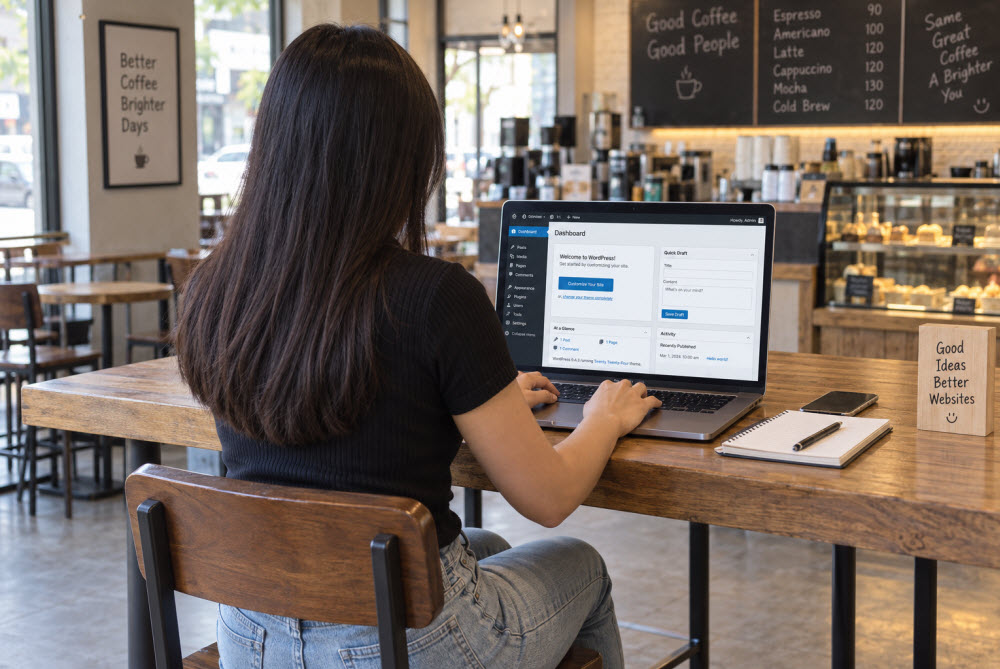
Learn how to work with posts, pages, media, comments, users, and basic settings. Understand the difference between draft, pending review, scheduled, private, and published content.
Content Formatting
Learn how headings create structure, spacing affects readability, and consistent formatting improves a page. Choose heading levels for content organization, not merely visual size.
Image Preparation
You should be able to choose appropriate dimensions, reduce file size, maintain acceptable quality, use clear filenames, and write useful alt text when the image needs it.
Basic SEO Understanding
Learn search intent, page titles, meta descriptions, internal linking, readable URLs, headings, and natural keyword use. A beginner does not need to become an SEO strategist, but should understand why these elements matter.
Accuracy and Quality Assurance
Develop a repeatable checklist for spelling, links, buttons, images, layout, metadata, and mobile display.
Communication and Documentation
Ask questions when instructions are incomplete. Provide concise updates, document completed work, and report problems with useful details. Instead of saying “the page is broken,” describe what happened, where it happened, and what you checked.
Safe Problem-Solving
When something unexpected happens, pause, record the issue, and avoid making several untracked changes at once.
Do You Need to Know How to Code?
You can begin offering content publishing, product entry, image preparation, and basic page updates without coding. Many WordPress tasks rely on the block editor, theme settings, plugins, and visual page builders.
Basic HTML and CSS can help you understand page structure and make small, authorized adjustments. Learn them gradually, but do not present yourself as a developer until you can safely handle that work.
Never paste unfamiliar code into a live website simply because an online answer says it will work. Test carefully and involve the appropriate technical person when a change affects site functionality.
Tools a WordPress VA May Use
Common tools include:
- WordPress editors: Block Editor or Classic Editor
- Page builders: Elementor, Divi, or another builder chosen by the client
- E-commerce: WooCommerce
- SEO plugins: Yoast SEO, All in One SEO, or another approved plugin
- Image tools: Canva or an image-compression tool
- Project management: ClickUp, Trello, or Asana
- Communication: Email, Slack, Microsoft Teams, or Zoom
- Analytics: Google Analytics and Google Search Console, when access is provided
You do not need to master them all. Focus on those used by your target clients.
How to Practice WordPress Without a Client Website
The safest place to learn is a website you control. Create a practice site through a local WordPress environment, a temporary testing service, or affordable hosting that permits experimentation.
Use your practice site to:
- Publish a properly structured article
- Build a simple About and Services page
- Create categories and menus
- Add and optimize images
- Install only trusted plugins needed for practice
- Create sample WooCommerce products
- Test page layouts on different screen sizes
- Make a backup before trying a larger change
Practice correcting errors as well as building polished pages. Keep notes and learn how to restore a safe version.
How to Build a Beginner WordPress VA Portfolio
Your practice website can become a portfolio sample even before you complete paid WordPress work.
Include examples such as:
- A formatted blog post with headings, images, and internal links
- A simple service page built from a reference layout
- A sample product page with variations
- Before-and-after images of improved formatting
- A short quality-assurance checklist
- A sample publishing workflow
Explain what you completed, the tools used, and your final checks. Never present practice work as a paying-client project.
How to Describe Your WordPress VA Services
Avoid vague descriptions such as “I can do anything in WordPress.” A focused service statement sounds more credible:
I help small businesses and content teams publish well-formatted WordPress posts, update website pages, prepare images, add WooCommerce products, and complete detailed pre-publishing checks.
Adjust the statement to match your real skills. Clear positioning helps clients understand where you can contribute.
A Safe Workflow for WordPress Tasks
Use a consistent process whenever you receive an assignment:
- Clarify the request. Confirm the page, deliverable, deadline, and approval process.
- Check access and instructions. Use your own authorized account whenever possible.
- Record the starting point. Note the original settings or take screenshots when appropriate.
- Confirm backup protection. This is especially important before updates or larger changes.
- Make the smallest necessary change. Avoid adjusting unrelated elements.
- Review the result. Check content, links, images, desktop view, and mobile view.
- Report completion. Explain what changed and identify anything requiring review.
This process may feel slower at first, but it prevents careless mistakes and becomes faster with practice.
Common Mistakes New WordPress VAs Should Avoid
Editing a live site without a backup
A small change can have an unexpected effect. Confirm that a usable backup or staging process exists before higher-risk work.
Installing plugins without approval
Extra plugins can create security, compatibility, licensing, or performance concerns. Use only tools the client has approved.
Ignoring mobile display
A page that looks correct on a computer may be difficult to use on a phone. Include responsive checks in your workflow.
Publishing without final approval
Unless the client has clearly authorized direct publishing, save the work as a draft and request review.
Offering tasks beyond your ability
Do not accept complex migrations, security repairs, custom code, or database work simply to win a project. Honest boundaries protect the website and your reputation.
Making undocumented changes
Record what you changed. Clear notes make review and troubleshooting much easier.
Frequently Asked Questions
Here are clear answers to some of the most common questions readers have about this topic.
Is WordPress difficult for a beginner to learn?
The dashboard and basic publishing tools can be learned gradually through regular practice. More advanced areas, such as custom development, database work, migrations, and security recovery, require additional knowledge.
Can I become a WordPress VA without work experience?
Yes. Create a practice website, complete realistic sample projects, document your process, and apply for assignments that match your demonstrated abilities. Be transparent that the samples are practice work.
What is the difference between a WordPress VA and a WordPress developer?
A WordPress VA commonly handles content, products, routine updates, basic layouts, and website administration. A developer typically handles custom code, advanced functionality, integrations, databases, and complex technical issues. Some professionals develop skills in both areas.
How much should a beginner WordPress VA charge?
Rates vary according to location, experience, task complexity, scope, turnaround time, and client market. Research current opportunities, calculate a sustainable minimum, and price according to the actual responsibilities rather than relying on one universal rate.
Which WordPress task should I learn first?
Start with creating and formatting a draft blog post. It teaches dashboard navigation, headings, links, images, categories, excerpts, featured images, and quality checks within one controlled assignment.
Key Takeaways
Before you close this page, here are the most important lessons to carry with you:
- A WordPress virtual assistant supports routine website content, products, pages, SEO details, and quality checks.
- You can begin with useful WordPress services without becoming a developer.
- A practice website allows you to build skills and honest portfolio samples safely.
- Accuracy, communication, documentation, and cautious problem-solving matter as much as tool knowledge.
- Start with a focused service list and expand only as your abilities become dependable.
“You do not have to master the entire website today; learn one careful task at a time, and each small success will build the confidence to take on the next.”
Final Thoughts
Becoming a WordPress virtual assistant is not about memorizing every menu, plugin, or technical solution. It is about learning how websites are organized, completing assigned work carefully, and knowing when to ask questions or seek technical help.
Begin with content publishing and other controlled tasks. Practice on a site you own, build a portfolio from honest examples, and create a checklist for every assignment. Over time, the skills that once felt unfamiliar can become a valuable specialization—and a practical way to help clients keep their websites useful, accurate, and up to date.